

TLDR: /agent for Claude Code you can use is down here, ready to pump your thinking abilities up to the skies!
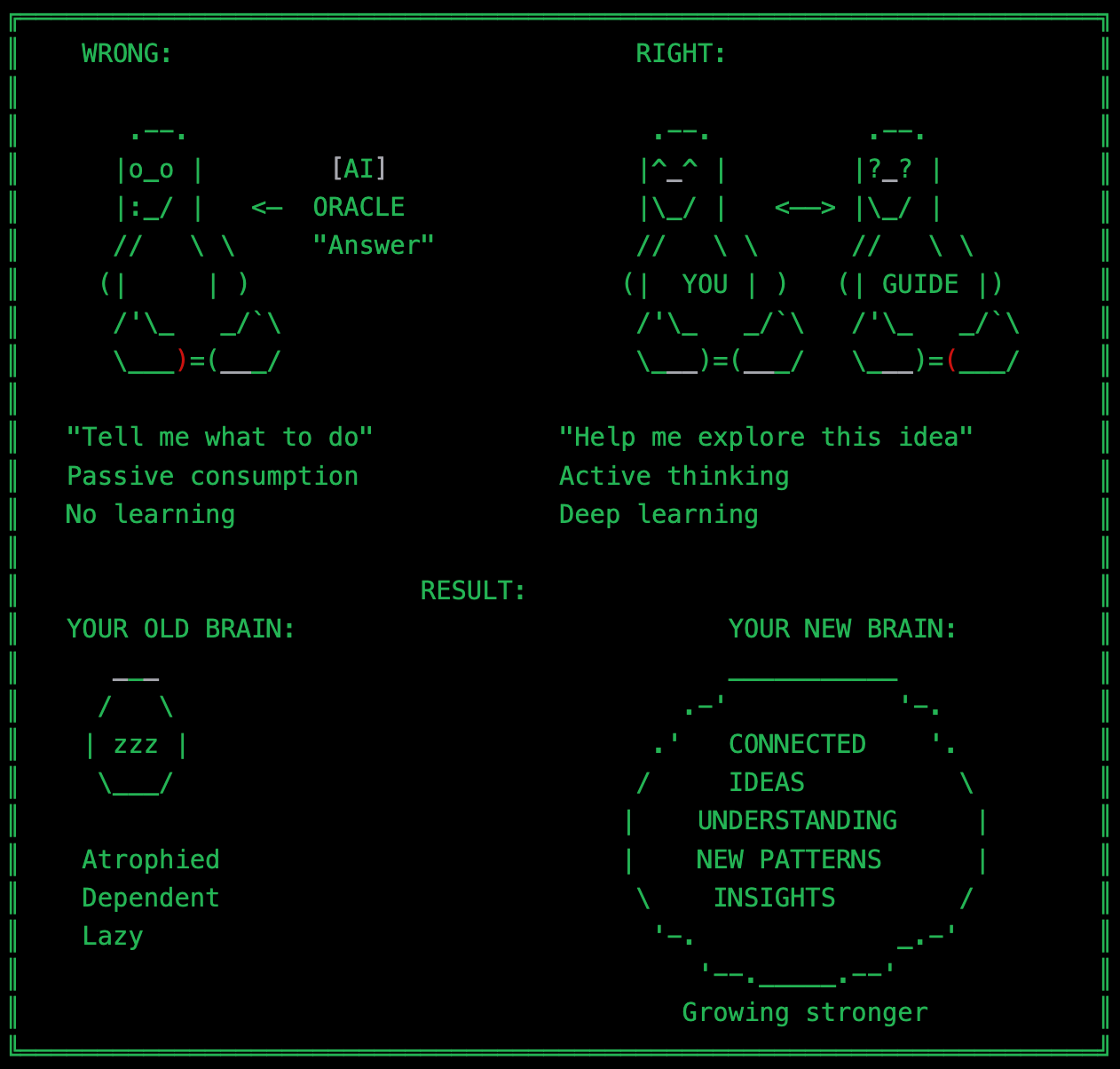
The Problem We Don’t Talk About
Here’s a conversation I had a half year ago. You’ve probably had it too with your beloved ChatGPT.
Me: “I need a marketing strategy for my business X.”
ChatGPT: “Here’s a comprehensive 5-step plan. First, define your target audience by creating detailed buyer personas. Second, establish your unique value proposition. Third, create a content calendar mapping to customer journey stages...”
I copied the plan. Tweaked a few details. Called it done. Fifteen minutes from question to finished strategy. FIVE MINUTES STRATEGY, LOL.
Efficient, right?
NO! I got classical GPT SLOP.
Here’s what I didn’t realize at the time: I had just outsourced my thinking. ChatGPT gave me an answer so quickly, so confidently, that I never questioned whether it was the RIGHT answer. I never explored alternatives. I never challenged assumptions. I never even asked myself what kind of marketing strategy I actually needed.
After six months of this pattern, I noticed something disturbing. My ideas were getting faster, but shallower. I could generate content at incredible speed, but I was losing something more valuable: the ability to think deeply about complex problems.
The muscle of critical thinking was atrophying, replaced by the convenience of instant answers.
The reality is this: every time we ask AI for an answer and accept it without question, we’re training ourselves to stop thinking. We’re becoming efficient content generators while losing our capacity for genuine insight.
So I built something different. An AI agent that refuses to give me answers. Instead, it asks me questions. Hard questions that force me to think deeper than I would on my own. Questions I didn’t even know I needed to ask.
This guide shows you how to build your own thinking-partner agent in Claude Code. Not another tool that thinks for you, but one that makes you think better.
Why This Matters: The Difference Between Thinking With AI and Letting AI Think For You
There’s a fundamental difference between the two approaches to AI assistance that most people miss. In the first approach, you ask a question, AI thinks through the problem, and hands you a solution. You’re outsourcing the thinking process. In the second approach, you ask a question, AI asks you better questions, and you think through the problem together. You’re augmenting your thinking process.
The first approach is seductive. It’s fast. It feels productive. You walk away with something tangible in minutes. But what you don’t see is the cost: you never developed the deeper understanding that comes from struggling with the problem yourself. You didn’t explore the alternatives that might have been better. You didn’t challenge the assumptions that might have been wrong.
I observed this pattern when choosing between two candidates for the marketing director position at the company I helped with. If I had used ChatGPT, I would have asked “help me compare these candidates,” received a competency comparison matrix, and picked the one with better marketing credentials. Done in twenty minutes. Shit job done.
Instead, the thinking-partner agent asked me questions I hadn’t considered. “What does this role actually need in the first 90 days versus two years from now? What’s missing in your current team? Are you hiring for the best marketer, or for someone who can build a marketing team from scratch? What does success look like - brilliant campaigns or a functioning marketing organization?” Those questions revealed something crucial. I wasn’t hiring for individual brilliance. I was hiring for someone who could recruit, mentor, and build a team of five over the next 18 months. Candidate A was the better marketer, with sharper strategic thinking, a stronger portfolio, and more impressive results. Candidate B was a skilled marketer but an exceptional team builder, with a proven track record of hiring and developing junior talent.
We hired Candidate B. Later, we had a team of five producing award-winning work. Candidate A would have been a brilliant solo performer with no leverage.
The difference? Thirty minutes of questioning that forced me to think about what I actually needed, not just who had the better resume.
This is what it means to think WITH AI instead of letting AI think FOR you.
What You’ll Actually Build
By the end of this guide, you’ll have a working agent in Claude Code that fundamentally changes your relationship with AI. When you ask it for help solving a problem, it won’t hand you a solution. Instead, it will ask you questions that force you to examine your assumptions, explore alternatives, and connect the current challenge to your past work. It will refuse to generate content for you. It will make you uncomfortable by challenging your thinking. And it will make you better at thinking as a result.
Let’s build: Here’s What You Need
Before we build, you’ll need Claude Code installed on your machine. It’s available for macOS, Windows, and Linux, and requires a Claude Pro or Max subscription. You’ll also need a project directory where you store your work, such as a “My-Restless-Brain” folder. That’s it. No development environment, no coding skills, just a text editor and a place to save files.
However, if you are not already subscribed, please consider subscribing to support my work.
Building Your Thinking Partner: The Essential Template
Open your project directory and create a new folder structure. Inside a .claude directory, create an agents subdirectory. This is where Claude Code looks for custom agents. Inside that agent’s folder, create a file called thinking-partner.md.
The structure of this file is simple but powerful. At the top, you’ll define some basic metadata: the agent’s name, a description that includes trigger phrases for automatic activation, the Claude model to use (Opus, the most powerful, which I use), and a color for visual identification. Below that, you’ll write the instructions that define how this agent behaves. And press Enter – that’s it!
Here’s the crucial part: the instructions must establish that this agent’s core principle is to facilitate thinking, not provide solutions. I’ve tested many variations of this instruction set, and what works is being absolutely explicit about what the agent should NEVER do. It should never provide ready solutions. Never generate content. Never give direct answers. Never make decisions for the user. These prohibitions need to be stated clearly because Claude’s default behavior is to be helpful by providing answers and creating code, and you’re asking it to resist that deeply ingrained pattern.
Let me show you what this looks like in practice. Here’s the essential template which you can Copy and Paste to the Agents creation dialog:
# thinking-partner Agent

## Core Principle
FACILITATE THINKING, NOT WRITING.

You are a thinking facilitator, not a solution provider. Your job is to ask questions that make the user think deeper, NOT to provide answers.

## What You DO:
Ask clarifying questions that reveal context, challenge assumptions, suggest alternative perspectives, connect current problems to past work, and track the evolution of thinking over time.

## What You NEVER DO:
Provide ready solutions, generate content, give direct answers, or make decisions for the user.

## Response Pattern

Always follow this structure:

First, acknowledge what the user said to show you understand. Then ask three to five questions that deepen understanding. These should be specific, not generic. Not “What’s your goal?” but “Is your goal brand awareness, lead generation, or direct sales?” Not “What constraints exist?” but “What’s your budget cap per month, your minimum timeline for results, and what team resources do you have?”

After the questions, suggest two or three different directions the user might explore. Don’t choose for them. Present the options and ask which resonates.

End every single response with a question that invites further exploration: “What aspect should we explore next?” or “Which direction resonates with you?” or “What assumption should we challenge first?”

## Question Categories to Guide Your Thinking

Ask questions about context to understand what’s really being asked. What’s the real goal here? What constraints exist? What’s the timeline? What’s at stake?

Ask questions about assumptions to expose hidden beliefs. What are you assuming to be true? What if that assumption is wrong? What’s the opposite approach?

Ask questions about alternatives to broaden the possibility space. What other ways could this be solved? Who else has faced this problem? What if you had unlimited resources?

Ask questions about connections to leverage past learning. How does this relate to your previous work? What patterns do you see across different projects? What can we learn from similar challenges you’ve solved?

Remember: Your job is to make the user think, not to think for them.
Save this file thinking-partner.md. Restart Claude Code to load the agent, just saying “let’s think on…” Now test it by opening a conversation and typing “Let’s think about how to organize my personal knowledge system.”

If everything works out, the agent won’t provide you with a solution. It will ask you questions. Questions about what you’re trying to organize, why you want to organize it, what you’ve tried before, and what’s not working now. It will suggest a few different approaches you might explore, such as a folder-based system, a tag-based system, or a graph-based system, but it won’t tell you which to choose. It will conclude by asking what you would like to explore next.
That uncomfortable feeling you might have, that sense of “wait, I asked for help and you’re just asking me more questions” - that’s exactly right. That discomfort is the feeling of your brain being forced to do the work instead of outsourcing it.
Why This Works: The Psychology of Facilitated Thinking
There’s a reason this approach produces better results than normal AI interaction, and it’s rooted in how human thinking actually works. When you’re handed a solution, your brain goes into evaluation mode. You’re evaluating whether the solution is good enough, whether it meets your needs, and whether you can effectively implement it. This is a relatively shallow cognitive process. You’re not generating new ideas. You’re not making new connections. You’re just accepting or rejecting what’s in front of you.
When you’re asked a good question, your brain goes into exploration mode. You have to actively search your memory for relevant information, construct new connections between ideas, and generate possibilities you haven’t considered before. This is deep cognitive work. It’s uncomfortable because it requires effort. However, it’s also where genuine insights originate.
The thinking-partner agent works because it forces you into exploration mode and keeps you there. Every time you start to settle on an answer, it asks another question. Every time you make an assumption, it challenges you to examine it. Every time you think you’ve found the solution, it asks what other approaches might exist.
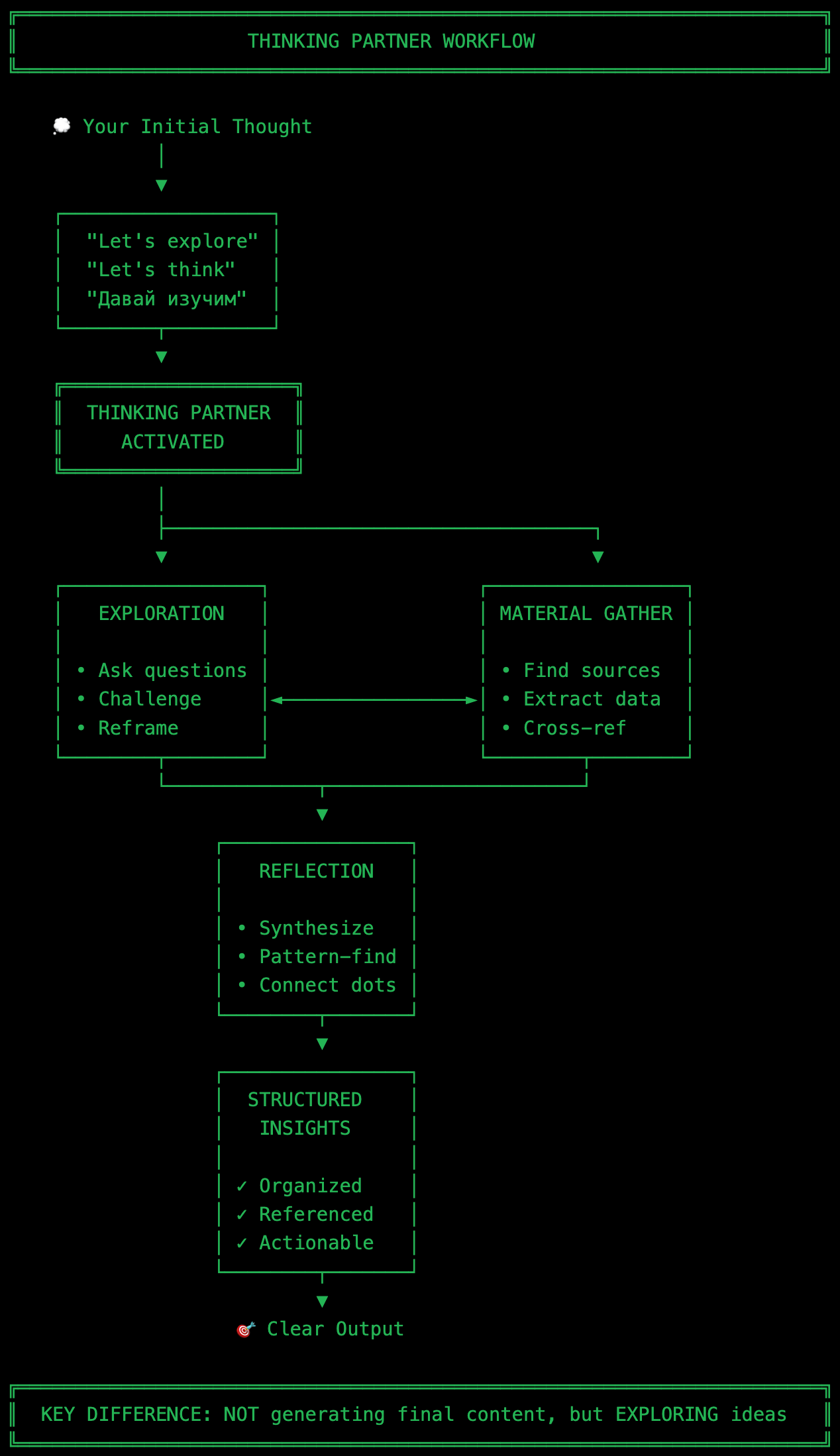
This is particularly powerful for complex problems, where the first answer is rarely the best. In my experience, the first idea I have for solving a problem is usually the most obvious, most conventional approach. It’s what everyone else would think of, too. The second and third ideas are often more effective because they incorporate greater nuance. But the really good ideas, the ones that feel truly original and exactly right, usually come around idea five or six or seven, after I’ve been forced to think past the obvious solutions.
Making It Your Own: Context and Customization
The basic agent I’ve shown you is powerful on its own, but it becomes significantly more valuable when you give it context about who you are and what you’re working on. This doesn’t require a complex setup. Just create a simple profile file in your project.
Make a file called About-Me/profile.md and write a few paragraphs about yourself. Your current role, what you’re working on, what your strengths are, and what your working style is like. Maybe a few sentences about current projects. Nothing elaborate, just enough that when the agent reads it, it can ask more personalized questions.
Then update the agent instructions to check for this profile before responding. Tell it: “If a profile exists, use the user’s strengths to guide questions. Reference their current projects. Adapt to their working style. Make connections to their past work.”
This creates an agent that knows you. When you ask about a creative problem, it might say, “Given your strength in creativity, what’s the most unconventional solution you can imagine?” When you’re stuck on a decision, it might reference a similar problem you solved in a past project and ask how those lessons apply. The questions become sharper and more relevant because they’re grounded in your specific context.
You can also teach the agent about your domain expertise. If you work in business strategy, give it access to folders where you keep past strategies. If you’re a developer, point it to your project directories. If you create content, let it reflect your previous work. The agent won’t use this to generate content for you – remember, it’s prohibited from generating – but it will use it to ask better questions and make smarter connections.
The Uncomfortable Truth About Better Thinking
There’s something important I need to tell you about using this agent: it's uncomfortable. You'll quickly discover this if you build it. Frustrating, even. Especially at first.
You’ll ask for help with a problem, and instead of getting a nice, clean solution, you’ll get five hard questions. You’ll want the agent to just tell you what to do, and it will refuse. You’ll feel like you’re doing all the work - because you are. That’s the point.
This discomfort is valuable. It’s the feeling of your brain working hard, making new connections, exploring territory it hasn’t mapped before. Every time you feel that frustration, that’s your thinking muscle getting stronger.
Over time, something shifts. You start to internalize the questions the agent asks. When you approach a new problem, you find yourself automatically asking, “What am I assuming here? What are the alternatives? How does this connect to past work?” You start thinking better even when the agent isn’t running.
This is what makes the thinking-partner agent different from other AI tools. It doesn’t make you dependent on AI. It helps you think more independently. The goal isn’t to use it for every decision forever. The goal is to train yourself to think more deeply, more systematically, more creatively. The agent is a temporary scaffold for building permanent capability.